Stacy Gastelum

Samsung Knox
Enterprise Solutions
2017-2021
-
Design System for Knox platform
-
IT admin device management web portal
-
Global UX team management
-
Design Thinking process advocate
PROBLEM
Four separate products built on four different design systems — inconsistent & dated patterns, fragmented workflows, and no shared design infrastructure to support rapid product growth.
GOALS
-
Design Strategy: Define a unified Knox platform vision — a consistent, scalable enterprise experience that reflects Samsung's brand and earns IT admin trust across all Knox solutions.
-
DesignOps Strategy: Build a design system grounded in user and business value first, then define scalable solutions designers could build consistently and engineers could implement confidently and fast — without reverting to external libraries.
MY ROLE
-
Design Leadership — Defined the Knox platform vision and guiding principles. Secured global senior leadership buy-in through high-fidelity directional mockups. Established a customer panel of 11 enterprise clients for ongoing validation. Spearheaded Design Thinking adoption across the HQ & global design teams, upskilling the team and raising the bar on user-centric practice across the organization.
-
Design Operations — Served as the design authority and primary design stakeholder for the Knox platform across multiple BU-aligned teams in a cross-functional leadership model. Led the Knox Design System from scratch — phased rollout across 4 products, adoption-first strategy through design-engineering pairing, and drove incremental design system expansion aligned to lean product delivery as new initiatives scaled the platform.
In this case study
A multi-year journey from fragmented enterprise systems to a unified design platform — where building the system was only half the work. Making it last required changing how the team thought, worked, and collaborated.
01
Discover — Understanding Problems Before Defining Solutions
Leadership interviews, cross-functional journey mapping, and a UX assessment that exposed fragmented systems and conflicting workflows — the foundation that shaped every design decision that followed.
02
Align — Vision, Principles & Workflow Strategy
Gaining global leadership buy-in through high-fidelity mockups, defining guiding principles rooted in user pain, and centralizing fragmented admin workflows into one coherent platform experience.
03
Build — Design System UI & Key Product Improvements
Reusable component architecture built hand-in-hand with Engineering, plus the key UX improvements — sign-up, first-time experience, dashboard, sliding panel — that brought the system to life in production.
04
Scale — Validation, Phased Launch & Unified Portal
Customer panel validation, cross-functional roadmap planning, and a phased rollout from MVP in 2018 to the unified Knox Admin Portal — the Red Dot Award winner that brought the vision fully to life.
Impact at a glance
+15%
User satisfaction
+6%
Sign-up conversion
+30%
Dev efficiency
2023
Red Dot Award
Value-first — user and business needs before components
Guiding principles defined before a single component was built. Grounded in user pain (friendly guidance, fast & efficient, personalized, consistent & scalable) — which is why Engineering adopted the system instead of working around it.
Introduced and championed Design Thinking across the HQ & global design teams
Spearheaded Design Thinking adoption as the team's operating methodology. Upskilled the HQ design team and raised the bar on user-centric maturity — establishing a shared framework for problem framing before solution design.
Design-engineering pairing over spec handoff
Embedded designers alongside engineers during implementation. Onboarding sessions and demo-driven socialization kept the system alive across product teams. 30% dev efficiency was the measure of real adoption — not just delivery.
Design authority across BU-aligned teams without direct org ownership
Led Knox platform design direction and design system roadmap across multiple BU-aligned teams through influence and cross-functional accountability. Primary design stakeholder to the engineering organization — ensuring design intent translated consistently across a globally distributed team.
1. Discover — Understanding Problems Before Defining Solutions
1.1 Leadership Interviews & Cross-functional Journey Mapping Workshop
Led an in-person discovery workshop with senior leadership and global cross-functional subject matter experts to identify customer journey pain points and align priorities.
Business needs:
Ambitious revenue target
Fast-track new cloud solutions
Support new B2B2C use cases
Customer needs:
A quick and easy way to manage enterprise mobile devices with policies that enhance security, privacy, and customization.

1.2 UX Assessment
Fragmented Design System
Existing solutions were built on different systems and lacked a consistent design language.
_edited_edited.jpg)
_edited.jpg)
Confusing Information Architecture & Workflow
Disconnected workflows forced IT admins to perform duplicate tasks and led to conflicting device policies, causing user frustration.


2. Align — Vision, Principles & Workflow Strategy
2.1 Guiding Principles
Defined guiding principles rooted in user pain points and needs to steer my design team.

2.2 Visual Design
Gained global senior leadership buy-in with high-fidelity directional visual mockups and successfully pushed new visual language to other design partners.

2.3 Optimize Workflow & User Journey
Centralized common management for devices, resellers, and licenses across various solutions into a single web console to streamline the admin workflow and journey.
Before
Managing a single device requires repeated actions and switching between various consoles.

After
Admins can easily accept new devices, update licenses, and invite other users with role-based access control (RBAC).

3. Build — Design System UI & Key Product Improvements
3.1 Information Architecture
Explored different navigation system designs and arrived at the most scalable pattern to accommodate various admins’ needs, as well as the growth and complexity of the Samsung Knox platform.

3.2 Design System UI
Defined UI elements based on the aligned visual language and collaborated with the front-end team to develop reusable components.

3.3 Sign Up
Added additional sign-up hooks on the product website, including a free trial to entice customers and a work email requirement to prevent errors during enrollment.

Before
Product Website
Signup flow
After
Product Website

3.4 First-time Experience
Guided first-time experience helping admins navigate the web console and start their first workflow.

3.5 Dashboard - Device Health Overview
By providing a device health overview on the dashboard, it eliminated the burden on admins of sorting device tables—limited to 100 devices at a time—and significantly shortened their workflows.

Before
Device status is only visible one page/100 devices at a time
After
Quick overview and easy to address device errors in bulk

3.6 Dashboard - Quick Actions
Before
Admins needed to go through each tab manually to access the status and take action, often missing critical errors and dealing with cumbersome workflows.

After
Action-driven view enabling multiple admins to quickly take role-relevant actions.

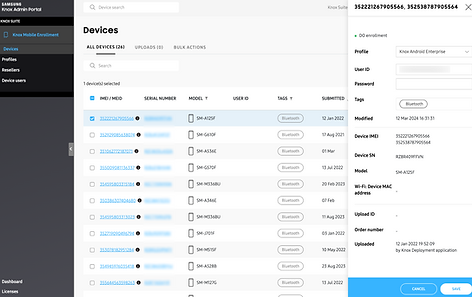
3.7 Sliding Panel
Enables uninterrupted workflows and easy access to manage bulk actions.

4. Scale — Validation, Phased Launch & Unified Portal
4.1 Validated With Customer Panel
Enterprise customers are not easily accessible for testing. I partnered with product managers from each solution and established a customer panel of 11 clients to validate new designs and provide ongoing input for future iterations.
4.2 Design Program Planning & Phased Delivery
Overhauling multiple consoles and changing the fundamental architecture required strong collaboration with product and development teams. I worked with development teams to break down design deliverables for phased releases and aligned with product managers on experience-led prioritization.


4.3 MVP Launch & Three New Consosles (2018-2019)
The MVP Design System was released in October 2018 for the existing consoles: Knox Mobile Enrollment and Knox Configure. Quickly followed by the launch of new solutions—Knox Guard, E-FOTA, and the Knox Reseller Portal—in 2019.
2018

2019

4.4 Driving Adoption Across Global Teams
Building the system was only the beginning. Adoption required a deliberate strategy: structured onboarding sessions for teams joining the system, demo-driven socialization across product groups, and pairing designers alongside engineers during implementation sprints. The 30% development efficiency gain confirmed teams were using the system in production — not working around it.
4.5 Launched Unified Experience Vision - Samsung Knox Admin Portal
Between 2020 and 2021, the vision came to life with the unified Samsung Knox Admin Portal, offering a centralized role-based device management experience.

Red Dot Winner 2023 - User Interface, UX/UI Design
The Samsung Knox Admin Portal won the 2023 Red Dot Award for its user-centric, research-driven interface, offering users clear insights into device health, admin, and license management.

_edited.jpg)
