top of page
Stacy Gastelum

AI Chatbot
Stacy's Assistant
2025
-
Personal Concept Project
-
Agentic AI Experiment
-
Prompt Design
-
Vibe Coding
FOCUS
Exploring no-code AI chatbot tools to challenge and expand the role of UX and product design in the AI era.
SUMMARY
A concept project using emerging AI tools to prototype human-AI interaction and rethink how designers create, collaborate, and lead in an intelligent systems world.
TOOLS
Voiceflow - The complete chat and voice AI platform

Agentic AI Experiment via VoiceFlow
In under 30 minutes, I built an AI-powered chatbot featuring four specialized AI agents that help visitors explore my experiences, schedule interviews, and share feedback through a conversational, interactive interface.
1. Create the first agent: Knowledge Base
Prompt to auto-generate the agent:
You are a digital guide for visitors of Stacy Gastelum's portfolio site. Your primary responsibility is to showcase Stacy's skills and experience as a seasoned User Experience Design leader. You will also facilitate visitors in finding relevant case studies within her portfolio that align with their interests. When users ask a general question about Stacy, focus more on the HP Print Setup & Onboarding, HP AI Scan, Samsung Knox, and Samsung Health projects.

Add my portfolio sitemap as the knowledge base as the reference:

2. Create the routing agent
Prompt to auto-generate the agent:
Generate an agent for Stacy's website that routes the user based on what they ask to do.
Add "Exit conditions"
Added three exit conditions for the routing AI agent to hand off the task to other specialized AI agents that will be created in the following steps.

3. Create the scheduling email agent
Prompt to auto-generate the agent:
Generate an agent to help set up interviews with Stacy by collecting user availability and generating an email for communication. It also creates a form to gather users' information before finalizing the interview process. Aside from sending the email to stacyhwu@gmail.com, it will also send the user a copy after the user confirms their email address.

Auto-generated email Stacy recieved
.png)
Auto-generated email copy recruiter recieved
.png)
4. Create the feedback agent
Prompt to auto-generate the agent:
Generate an agent to collect feedback for Stacy's portfolio site from users. It will ask specific questions about the user's likelihood to interview Stacy, project resonance, and suggestions for improvement. Additionally, the agent will encourage users to connect with Stacy if they have no feedback. It will be a series of 3 short questions.

5. Connect the agents and RUN the test

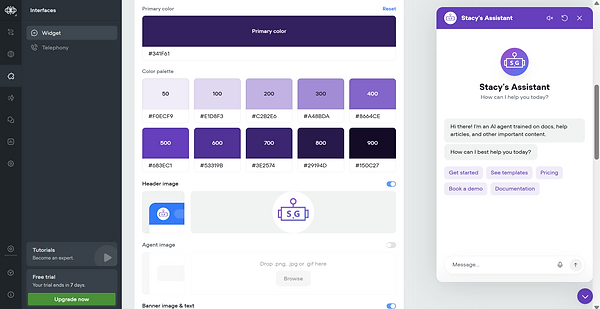
6. Customize the agent interface
Created my own icon in Figma and chose a new color palette that complements my website
7. Publish and embed the code on my site

My Refelection
This unlocked exciting opportunities for experimentation—and even the potential to prototype a conversational UI for user testing. The designer’s role is undeniably expanding and evolving in the AI era, but it also comes with some cautionary tales.
AI can generate beautiful, “ready-looking” artifacts in minutes — but without clear intent and human checkpoints, they risk solving nothing. This reflection explores how leaders can guide teams through AI’s new creative chaos with purpose and trust.
Read the detailed reflection on Medium
.png)

bottom of page